How I Actually Use Claude Code
My exact Claude Code setup across three production projects — kitty + tmux + lazygit, the GSD skill system, branch-aware permissions, and why written rules beat prompting harder.
Most “AI coding workflow” posts show someone asking ChatGPT to build a todo app. That’s not a workflow. That’s a demo.
Since late 2025 I’ve been running the Claude Code workflow as my primary development approach across three production projects — not as an assistant I occasionally paste code into, but as a CLI agent living in my terminal, following written rules, operating within guardrails I set. Here’s the actual setup.
This post sat unpublished on my disk for five and a half months. The numbers in it are now measured rather than asserted: the dashboard are generated from the same database this workflow writes to, and say 5,990 sessions, 384,084 messages and 155,730 tool calls across 314 active days.
The Stack That Makes the Claude Code Workflow Click
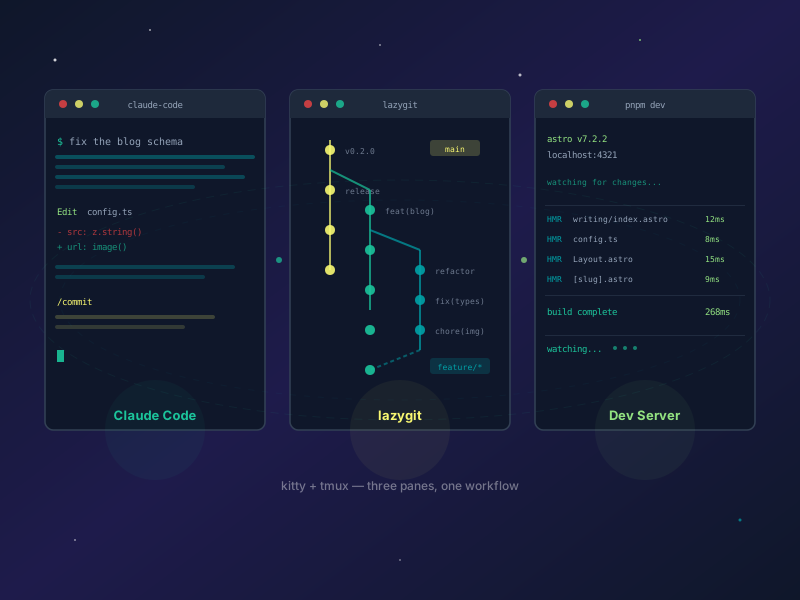
My terminal is kitty running tmux with three panes open at all times:
- Pane 1: Claude Code CLI — where I prompt, review, and iterate
- Pane 2: lazygit — full git UI for staging, committing, pushing, rebasing, branch management
- Pane 3: dev server —
pnpm devrunning continuously
This is the critical part: Claude Code never starts the dev server. It’s already running. Claude never pushes code, never creates branches, never rebases. Those operations live in lazygit, which I control. Claude is deliberately locked out of destructive git operations.
Why this split? The most dangerous thing you can do with an AI coding tool is hand it full autonomy over your repository. Claude Code is powerful. That power needs boundaries. lazygit gives me a human checkpoint on every single change before it leaves my machine.
Terminal-first means zero context switching. I’m not tabbing between a browser IDE, a separate git client, and a terminal. Everything is right there, one Ctrl-b away.
The GSD Skill System — Research to Verify in One Loop
Claude Code supports custom skills — slash commands that trigger structured behavior. I use one called GSD (Get Shit Done) that turns vague project goals into phased, verifiable work.
The loop:
/gsd-new-project— I feed it a PRD or rough spec. It researches the tech, identifies unknowns, and produces a phased roadmap./gsd-plan-phase N— Plans the specific tasks for phase N: what files get created, what gets modified, what the acceptance criteria are./gsd-execute-phase N— Claude does the work. On a feature branch, this runs autonomously — writing code, running checks, committing after each logical chunk./gsd-verify-work— Confirms the phase actually delivered what it promised, rather than merely that the tasks were marked done.
Then I review everything in lazygit, push when I’m satisfied, and move to the next phase.
I also wrote my own /jja-commit skill that auto-generates changelogs and follows Conventional Commits format, plus a /jja-release skill for semver bumps. Neither is fancy — they’re just structured enough to prevent the chaos of untracked changes piling up. GSD isn’t mine; those two are.
This beats “just prompt and hope” because it introduces checkpoints. Every phase has a plan before execution starts. Every execution ends with verification. I’ve caught Tailwind v4 migration errors, missing type exports, and broken dynamic routes at the verify step that would have shipped otherwise.
Branch-Aware Permissions
Most people skip this part: the Claude Code workflow behaves differently depending on what branch I’m on.
Feature branches (feature/*, fix/*, hotfix/*) — Claude operates autonomously. It commits freely, runs the full GSD loop without asking permission, and moves fast. This is where agentic engineering actually works — not “vibe coding” in the casual sense, but orchestrated LLM agents following structured rules to produce real software.
Protected branches (main, develop) — Claude is locked. No commits without me explicitly saying “commit.” No automatic changes from GSD or agents. It asks: “We’re on develop. Want me to commit these changes?”
This is configured in my global CLAUDE.md file, not in some settings panel. Claude reads it at the start of every session. The rules are version-controlled, portable, and auditable.
The rule earns its keep on ordinary mornings. This site’s own accessibility pass ran entirely on a feature branch — sweeping 113 colour classes, rewriting two chart components — and every commit happened without me being asked. The merge back to main did not. That’s the whole design: fast where mistakes are cheap, gated where they aren’t.
Project Receipts — Three Real Builds
Theory is cheap. Here’s where this workflow has actually shipped.
jjaimealeman.com (this site)
Astro 7 on Cloudflare Workers. It started on Astro 5 and Cloudflare Pages, and both migrations happened through this loop — the Pages-to-Workers move being the more interesting one, since it changed how the site is served rather than how it’s built.
The Tailwind v4 migration was caught mid-phase: the verify step flagged every instance of bg-gradient-to-* that needed to become bg-linear-to-* before I pushed a broken build. JSON-LD schemas — WebSite, Person, BlogPosting — were added across the Layout component in one session.
The dashboard is the part I’d point at. It reads my actual Claude Code usage database, applies a privacy allowlist, and publishes the result at build time. It is the most direct answer to “does any of this actually work” that I can give.
915website.com
My freelance web development business — 10+ years of building for the web, currently with Astro, Nuxt, and Cloudflare. The contact form needed real spam protection, not a checkbox. Claude built a 4-layer defense in one GSD cycle: a honeypot field, Cloudflare Turnstile integration, KV-backed rate limiting per IP, and server-side validation. I pointed it at MCP servers connected to the Cloudflare API so it could verify bindings and test the KV namespace directly. The form has been live since launch with no spam getting through.
SunCityStreetScene.net
Sun City Street Scene is a community project for El Paso’s car culture scene — event listings, photo galleries, and local coverage. This one pushed the workflow hardest because of the content volume and the number of moving parts across the stack.
GSD was essential here because the architecture had real complexity across multiple integrations. Planning each phase before executing it prevented the kind of spaghetti you get when you let an AI agent “figure it out” across 15 files simultaneously.
Where the Guardrails Live
The single most important file in my workflow is CLAUDE.md. Every project gets one. It’s the contract between me and the AI.
Mine specifies:
- Banned packages —
@nuxthub/coreis explicitly forbidden because NuxtHub was sunset in December 2025. Without this rule, Claude would happily suggest it based on training data. - Database permissions — SELECT queries are autonomous. INSERT, UPDATE, DELETE require my explicit consent.
- Dev server rules — Never run
pnpm dev. Never kill a running process. The dev server is mine. - Commit conventions — Conventional Commits format, specific scopes, changelog generation.
Claude Code is most dangerous when it has too much autonomy and no written rules. A well-written CLAUDE.md turns it from a wildcard into a reliable team member. Every project-specific quirk — the wrangler.jsonc trailing comma bug, the Tailwind v4 class renames, the content collection schema requirements — lives in that file so Claude doesn’t have to rediscover them every session.
What This Workflow Is Not
Not a replacement for understanding what you’re building. Claude Code is fast, but if you can’t read the diff and know whether it’s right, you’re just generating bugs faster. Every change goes through lazygit before it goes anywhere.
Not zero-review. The entire point of the lazygit pane is that nothing ships without a human reading the diff. The verify step catches type errors and missed acceptance criteria. It doesn’t catch bad architecture decisions. That’s still my job.
Not infallible, either — and the failures are the useful part. Building the keyboard navigation for this site’s activity heatmap, the agent indexed the wrong array: the readout it wrote checked a property that only existed on a different object shape, so every arrow key reported “No activity” on days with a thousand messages. Tapping worked. Keyboard didn’t. It shipped because it was verified as “the handlers are present in the built HTML” rather than by pressing an arrow key. I found it on my own dashboard, on my own phone, the same afternoon.
Not free. Claude Code runs on the API, and a complex GSD execute-phase with multiple file edits, a typecheck pass, and a verify loop burns real tokens. Know your usage before you run 10 phases in a day.
Not for toy projects. The GSD overhead — planning phases, writing PRDs, verify steps — doesn’t pay off on a weekend script. It pays off when you’re coordinating multiple integrations across 30+ files. If your project fits in one file, just prompt directly.
What the Numbers Actually Say
The tool distribution is the part that surprised people I’ve shown it to. Across 155,730 tool calls, mine is Bash at 48.4%, Read at 21.9%, Edit at 8.6% — a read-to-edit ratio of 2.6×.
Using AI as autocomplete produces an Edit-heavy profile: code being generated into files. Mine is Bash-dominant, which is a different activity entirely. That’s running things, inspecting output, checking state, verifying. Operating a system rather than authoring one.
That distinction is the entire argument of this post, and I didn’t have the data to make it back in March.
Try One Thing
Write a CLAUDE.md before your first prompt. Not after you’ve been fighting the AI for an hour. Before. Tell it what it can and can’t do. Tell it about your stack, your conventions, your banned packages. Give it the rules, and it will follow them.
Links
- Claude Code Overview — Official docs for the Claude Code CLI, including setup and configuration
- Conventional Commits — The commit message spec that the
/jja-commitskill follows - GSD (Get Shit Done) — The skill system that structures Claude Code into phased, verifiable work. Not my work.
- 915website.com — My freelance web development business, built with Astro on Cloudflare
- Sun City Street Scene — El Paso car culture community site, built with this workflow